Skip to content

For lawyers and law firms

Master your case file.

Bring documents, deadlines, evidence, precedents and pleadings together in one workspace. Modern Hukuk links what is in your file to its sources, so you can run your work from research to hearing on the same file.

The whole file in front of you. The legal judgement in your hands.

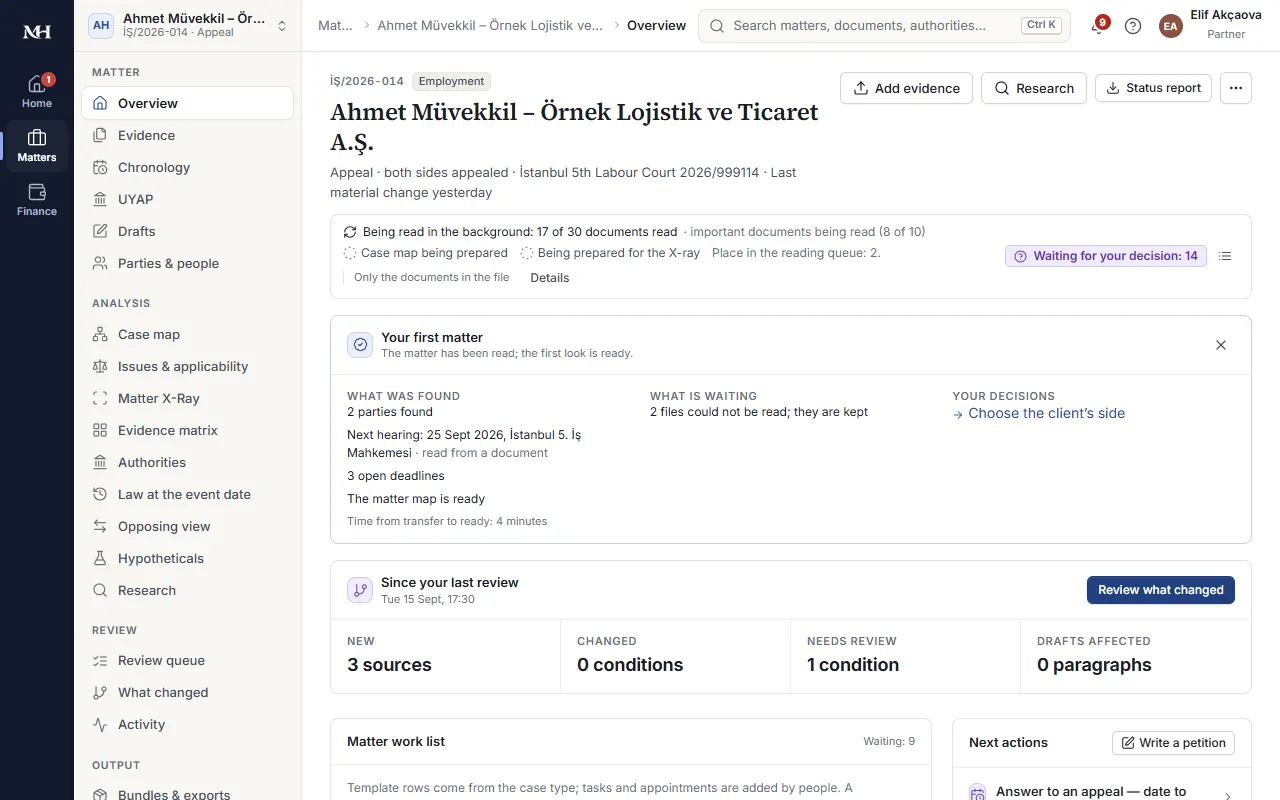
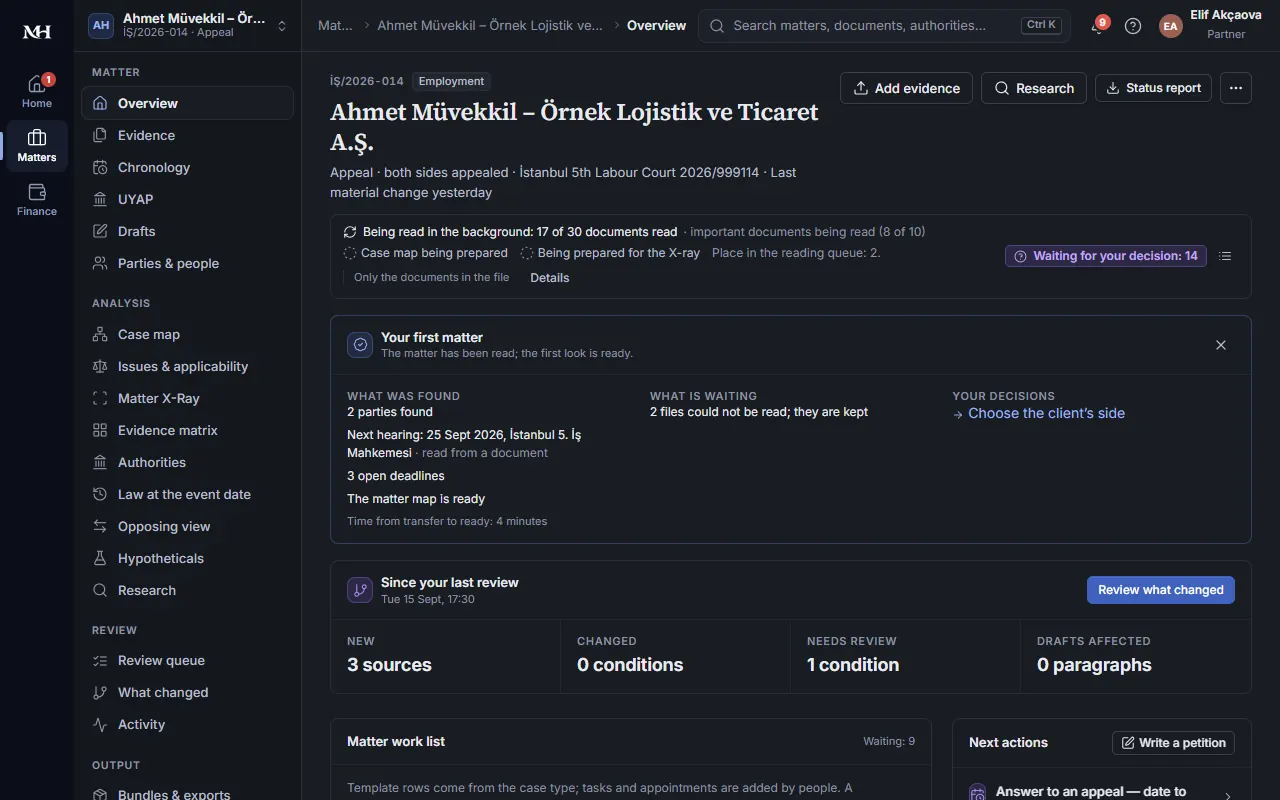
Matter overview: documents, deadlines and analysis links on one screenMatter overview: documents, deadlines and analysis links on one screen

A new document, shown in its place in the file.

Modern Hukuk extracts the type, key dates and content of an incoming document and links it to the parties, the file's history and the deadline computations involved. You see what the new document says and what work it brings up, together.
The basis of every assessment, one click away.

From a document summary to a precedent comparison, from the answer to your question to a draft pleading, go straight to the relevant sources. Review each statement side by side with the document passage or legal source it rests on.

How it works

  1. Bring your file in.

    Import the documents, parties, counsel and file history from UYAP with the browser extension. Upload the documents you hold to the same file. Modern Hukuk shows the state of the import and the documents still missing.

  2. Let the information find its place.

    Each document's text, type and key dates are extracted; events and document links are organised. Deadline suggestions and summaries of new documents appear in your file. Points you need to clarify are flagged separately.

  3. Assess the file as a whole.

    In Matter X-Ray, review events, legal conditions and evidence together. Which assessment rests on what, where is information missing, which point is disputed? Compare relevant precedents with their similarities and differences.

  4. Carry on from the same place.

    Ask your file questions, prepare pleadings, put deadlines in the calendar and assign tasks to your team. Hearing preparation, client communication and financial records move along with your file.

What you can do with Modern Hukuk

Four profiles, one connected way of working

See why a precedent matters to your file.

A decision citing the same statutory provision does not on its own show whether it fits your file. Events, evidence, legal conditions and the stage of proceedings matter too. Modern Hukuk's profile system brings this information together in a form you can compare.

Decision profile

  • Outcome and reasoning
  • Facts
  • Defences
  • Kinds of evidence

Matter profile

  • Your events
  • Your evidence
  • Legal conditions
  • Stage of proceedings

Case type: legal conditions, kinds of evidence, procedural steps

Firm: templates, drafting preferences, practice areas

Decision profile

Follow the court's reasoning.

Which events did the court assess? How did it deal with each legal condition? Which evidence and provisions did it rely on? The decision profile shows the outcome, the reasoning, the facts, the defences and the kinds of evidence together with the relevant passages of the decision. You see a party's claim, an expert's opinion and the court's finding separately.

Matter profile

See the legal framework of your own file.

Your events, your evidence, the legal conditions you assess in your file and the stage of proceedings are considered together. The matter profile compares this with decision profiles and shows the reasons behind each precedent suggestion and where they part ways. Missing information is never presented as a difference.

Case type profile

Build your review around the issues that matter.

Review the legal conditions, kinds of evidence, defences and procedural steps addressed in a given type of case in one place. The case type profile shows which issues to examine in your file and which evidence you could look for. Widen your review by looking at it alongside the evidence you already have.

Firm profile

Carry on the way your firm works.

The types of case you handle, the templates you use and the drafting preferences you set are reflected in your workspace. Use your firm's heading layout, form of address, section order and signature block in your pleadings. Follow new decisions in your firm's practice areas in a single stream.

What does this connection give you?

When you open a precedent suggestion, you see which conditions align, where there are differences and which issues were not assessed. You can move from the relevant paragraph of the decision to the evidence in your file, and from there to the legal reasoning of your pleading.

Differences are shown alongside similarities. You decide what place a precedent has in your file.

Matter X-Ray

Review event, evidence and legal condition together.

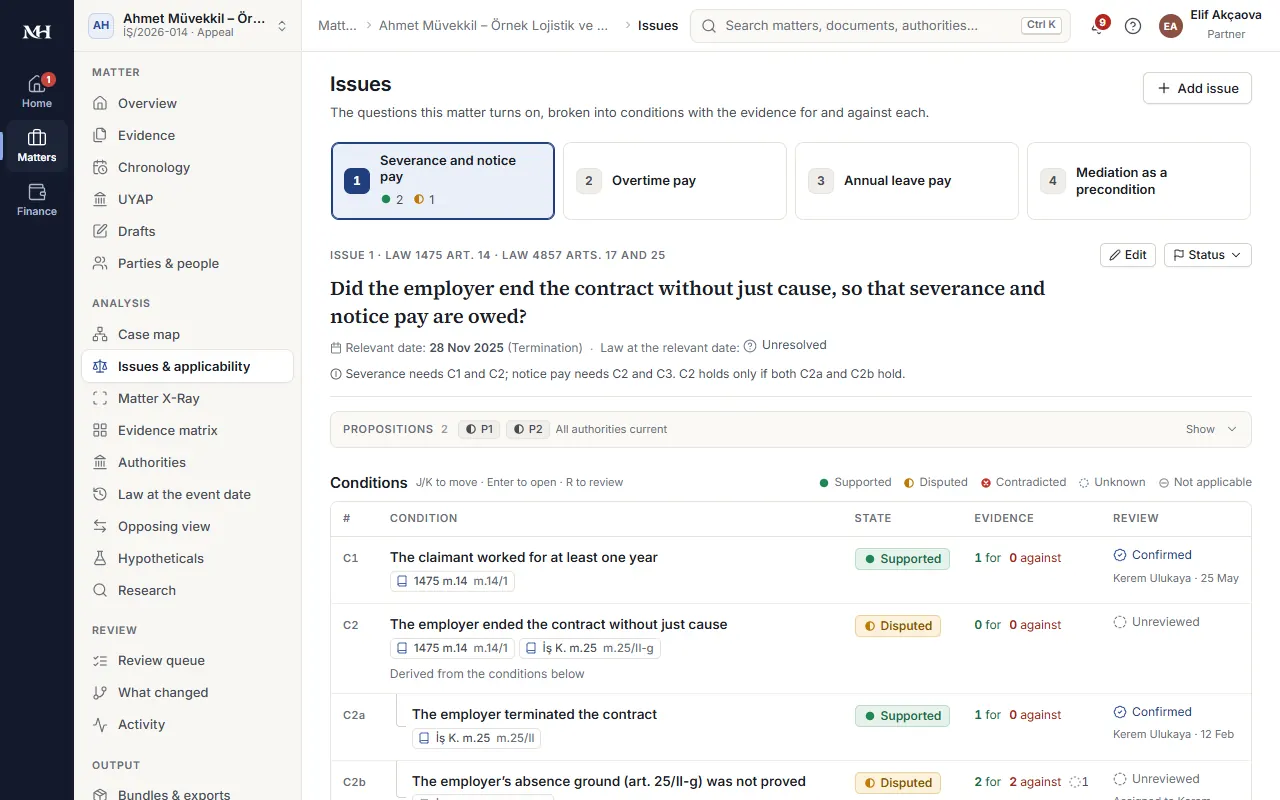
Matter X-Ray brings a narrative of events grounded in your documents together with the legal framework of the file. You see which condition is supported by which fact and document, and where there is a contradiction, missing information or a need for review.

The documents reviewed and the issues assessed are visible. Where there is not enough information on an issue, this is stated plainly. Open the sources, correct the suggestions and confirm your legal assessments.

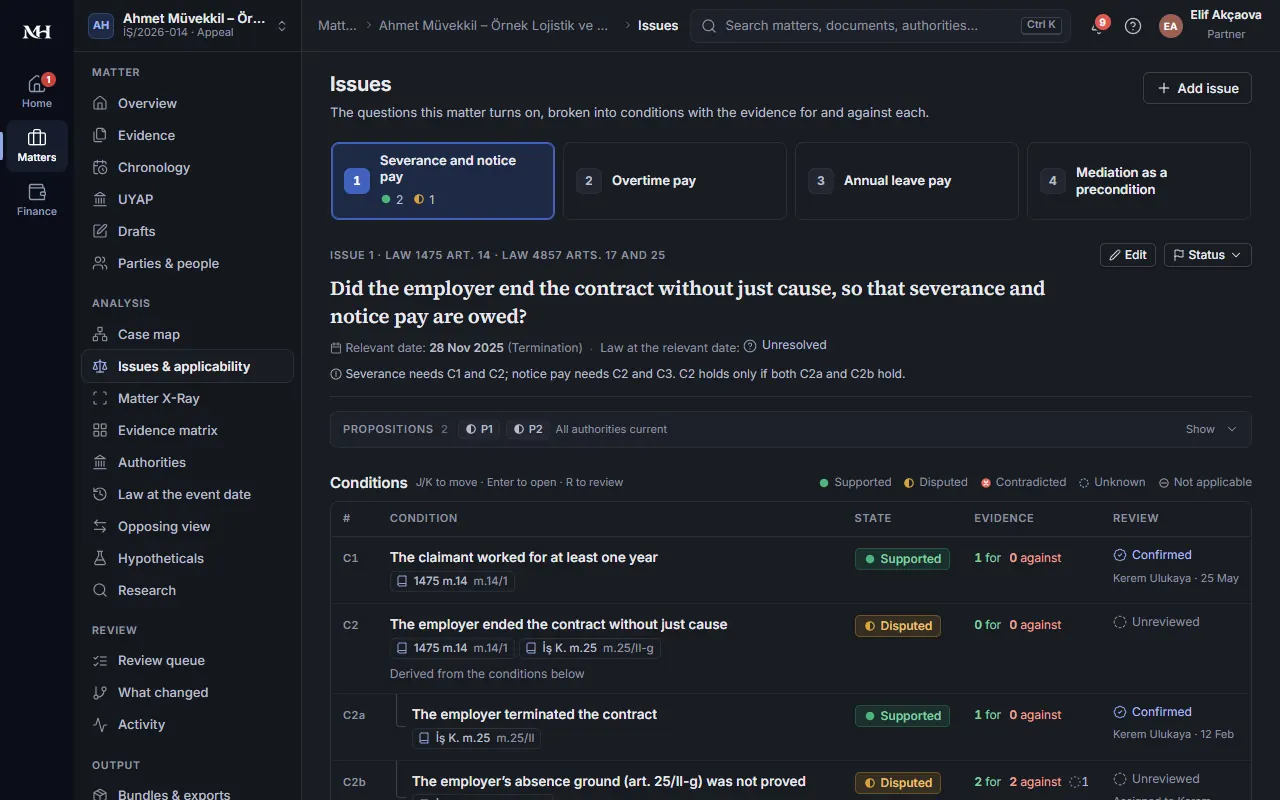
Legal conditions, their status and the evidence for and againstLegal conditions, their status and the evidence for and against
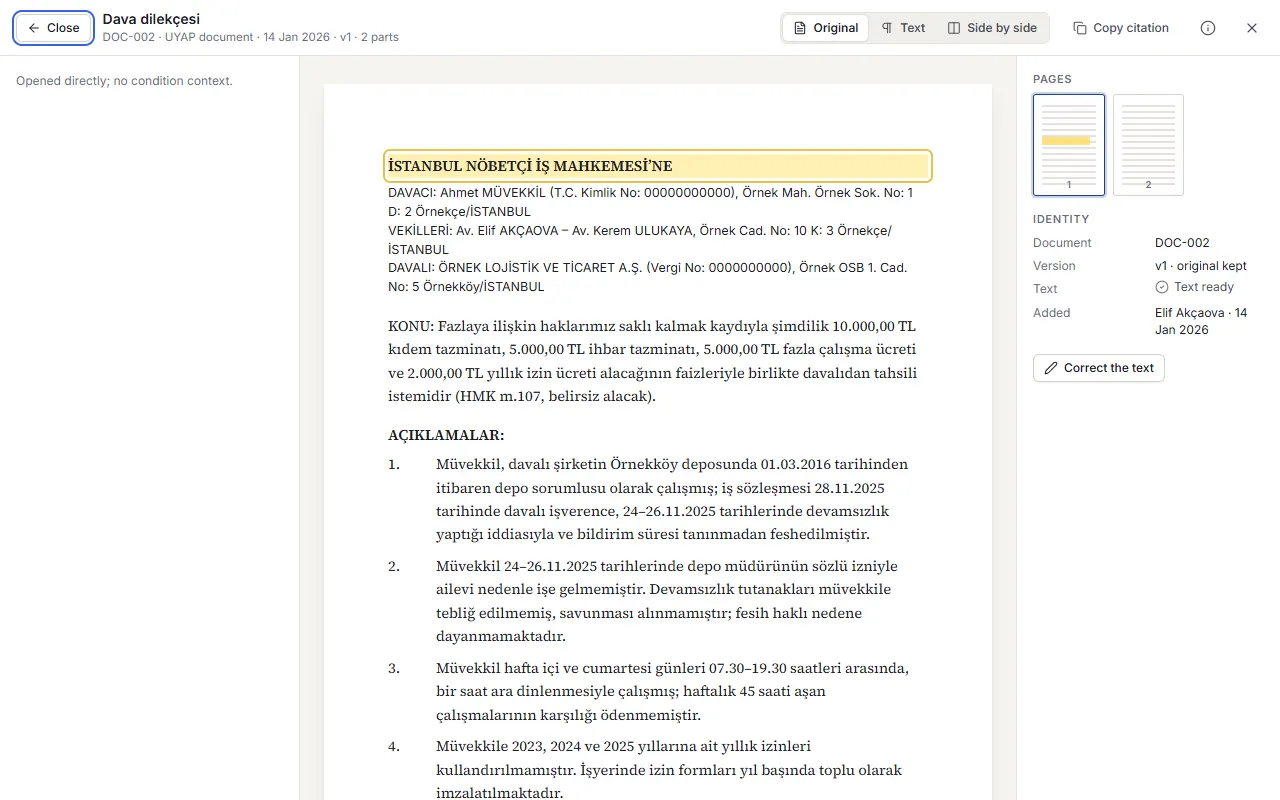
Document reader: the original document with its marked passageDocument reader: the original document with its marked passage

UYAP import and file history

Your UYAP file, in your workspace.

Import documents, file history, and party and counsel details together. Follow first instance, appeal and cassation stages with their own court and file details. See new and changed documents; resume an incomplete import where you left off.

The browser extension reads information from UYAP; it takes no action on your file. Documents you upload yourself and electronic notifications take their place in the same file.

Document reading and summaries

Reach the key points of a document, from the source.

Review the claim, the parties, key dates and amounts with the passages they come from. Keep UDF, PDF, Word and scanned documents in the same file. The document's type and its role in the file are suggested; uncertain readings and classifications are visible.

Manage automatic summaries of new documents according to your firm's preference. Summarise documents you uploaded earlier whenever you wish. Files that cannot be read are kept; you can download them and send them for reading again.

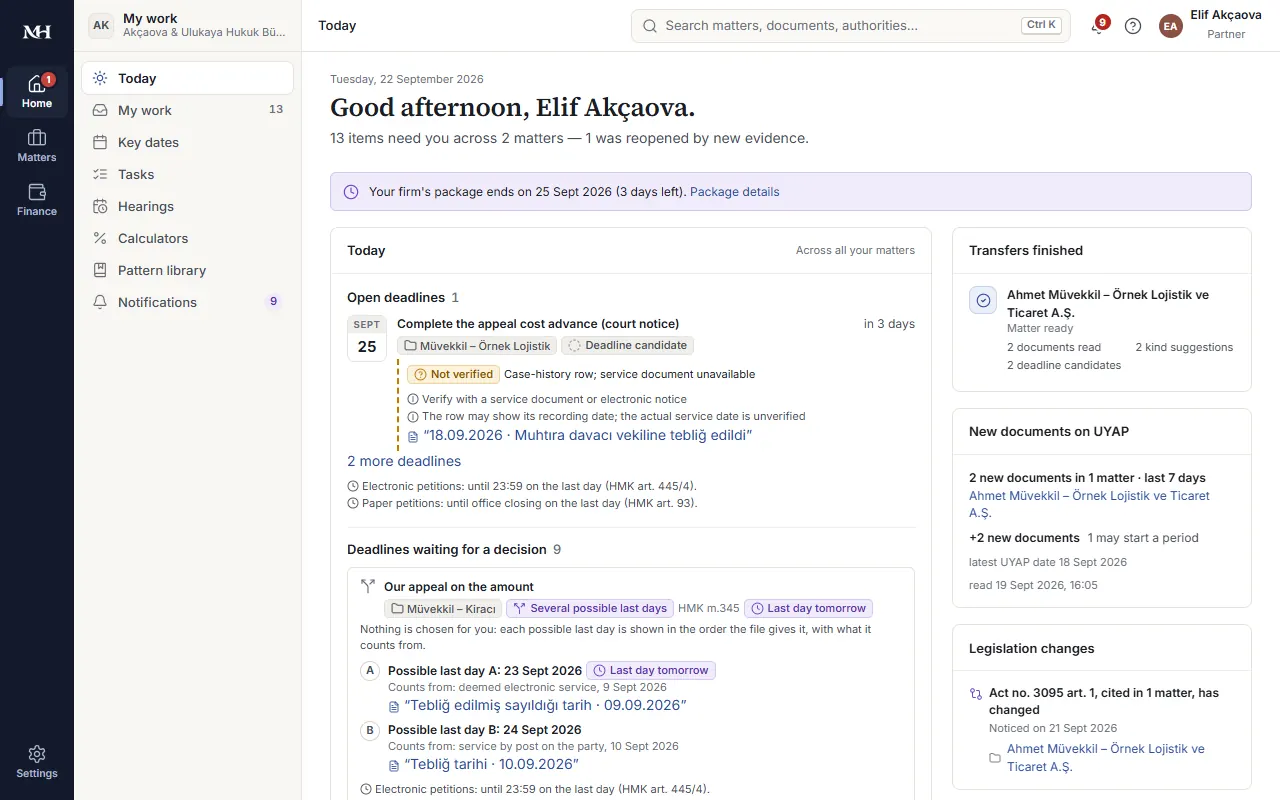
Today: your files' deadlines and pending workToday: your files' deadlines and pending work

Deadlines, calendar and hearing preparation

See both the computation and its basis.

The service date, the rule applied, the last day and the closing time appear in one place. Where more than one date or rule is in play, review the alternative computations with their reasons. If information is missing, see which input is needed; put the deadline you choose in the calendar.

On the day of a hearing, reach the relevant interim decisions, tasks and documents from your phone. A hearing date set in a new record and the work it brings are tracked with your file.

Today

Start the day with your files' agenda.

Upcoming deadlines, hearings, new documents and the work waiting for you come together in one list. See what has changed in which file; go straight to the document or task concerned.

Set the morning summary and critical deadline notifications to your preferences. Follow new decisions in the types of case you handle from your daily stream.

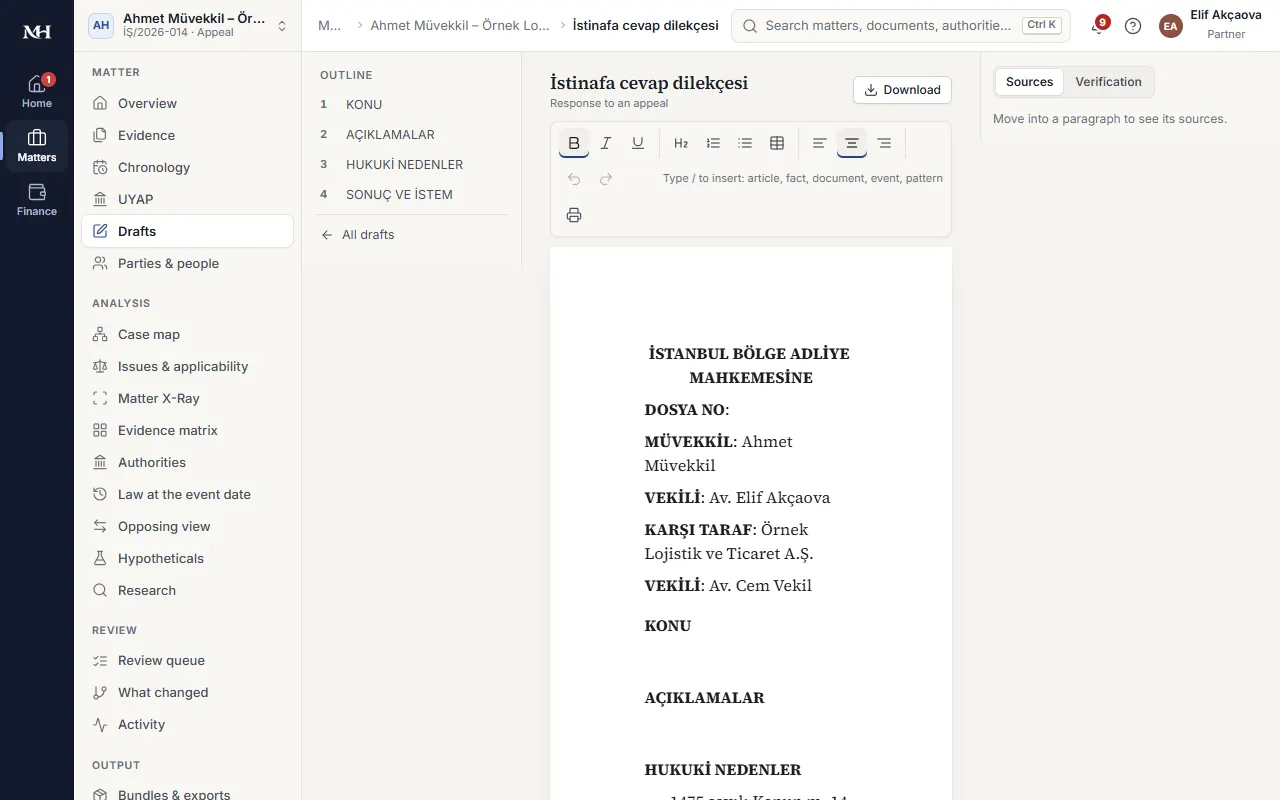
A draft pleading opened with the file's informationA draft pleading opened with the file's information

Ask this matter

Ask your question. See what the answer rests on.

“Which documents does this claim rely on?”, “Where do the parties' statements diverge on this point?”, “Which dates matter in the documents I selected?” Ask questions from within your file and review the answer with the relevant document passages.

For questions that need legal research, your file's documents and public sources are shown in separate sections. You can have selected documents reviewed on a particular issue and keep the answers in your file as sourced notes.

Case law and legislation research

Start your research from your file's question.

Describe what you are looking for in your own words. Research decisions of the Court of Cassation, the Council of State and the regional courts of appeal together with legislation; narrow your search by court, date and the provisions involved. Reach the full text and source details of each result.

Review legislation in the version that applied on the relevant date. Where the commencement information is uncertain, you see that. Carry the sources you select into your file's review and your drafting; return to earlier research.

Pleadings and Word

Start your pleading with what your file knows.

Parties, the narrative of events, dates and authorities are carried from your file into the draft. Work with your firm's own patterns or with pleading templates. Weigh alternative wordings; review suggested changes with version differences.

Check the narrative of events against its evidence and the legal reasoning against provisions and precedents. Continue in your firm's document layout with the Word add-in. The final say on the text, and on sending it, is yours.

Changing authorities and alternative reviews

When new information arrives, see the work it affects.

A new document, a changed source or a corrected detail can affect earlier notes, assessments and drafts. Modern Hukuk shows these connections and marks the work you need to look at again.

Explore alternatives such as “Which authorities are affected if I leave this evidence out?” in separate scenarios. See the effect of a change within the issues covered while your existing records stay intact. Follow changes in legal sources through the files they concern.

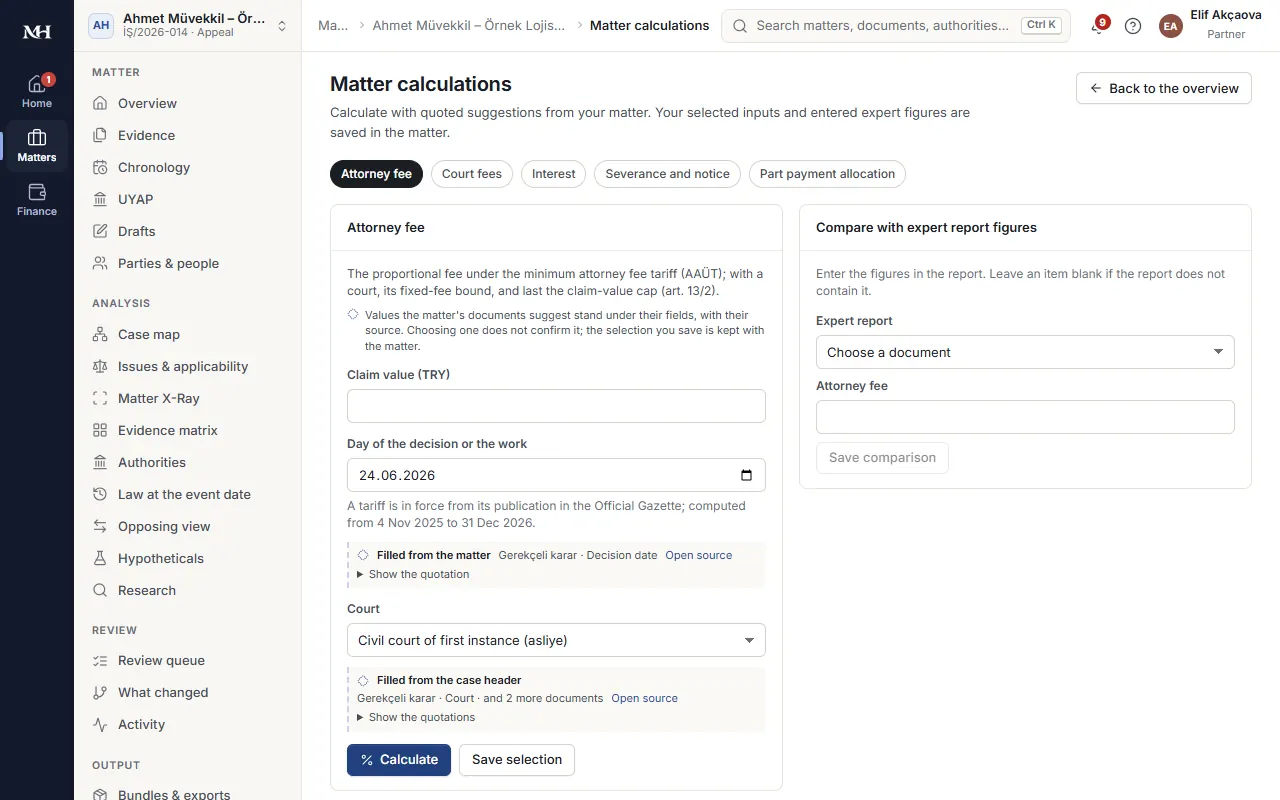
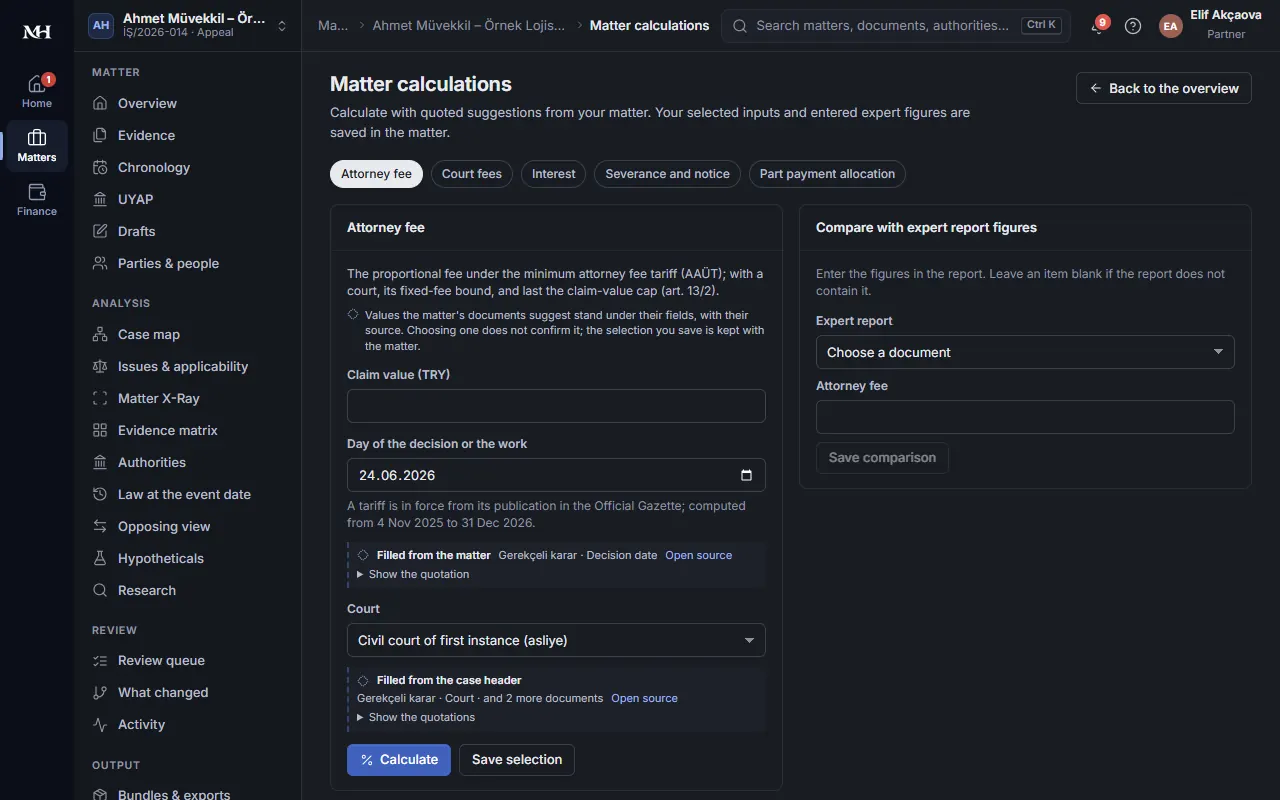
Attorney fee computation filled from the file, with its tariff yearAttorney fee computation filled from the file, with its tariff year

Teamwork and client communication

The file's knowledge, in the hands of the authorised team.

Assign a responsible lawyer to each file, share tasks and run the work awaiting review together. Manage access across offices and teams; set separate permissions for restricted files. Follow who did what in the activity history.

You choose the documents and status information to share in the client portal. Review the prepared status summary before sharing it; the file's internal working notes and what is opened to the client stay apart.

Calculators and firm finances

Manage the financial side of the file from the same place.

See court fee, attorney fee, interest and severance computations with the tariff year and data series used. Link expenses, advances, collections and client money records to the file; report on your firm's financial movements.

Track cheques and promissory notes, bank movements and self-employment receipts. The basis of each computation and the history of each record stay visible.

Why Modern Hukuk?

The file's knowledge, in one place.

Reach the event while reading a document, the evidence while reviewing a fact, the relevant condition in your file while weighing a precedent. Let research and drafting move forward with the knowledge of the same file.

The reason behind each suggestion is visible.

Open the document passage behind a summary, the rule behind a deadline computation, the similarities and differences behind a precedent suggestion. Make your assessment with its source.

Your firm's work, in your firm's way.

Drafting preferences, templates, task allocation and access permissions fit the way you work. Reading and organising run automatically; legal assessments become part of the file's record only with your approval.

Privacy and security

Access to your files stays under your control.

  • Your firm's data is kept separate from other firms. You decide which files teams and users can see and what they can do. Manage access at file level with restricted files and information barriers.

  • Documents pass malware and file integrity checks when uploaded. Activity records and backups help preserve the history of each file. Operating the service does not grant authority to view the content of your files.

  • For AI tasks, content may be passed to the providers chosen for the service. The conditions of processing, retention and transfer are set out in the privacy and information notices.

  • The UYAP extension does not store your password, cookies or e-signature; it only reads information.

Four profiles that complement each other

4 profiles

  • Decision
  • Matter
  • Case type
  • Firm

A structure linking the court's reasoning, the authorities in your file, the review headings of the case type and your firm's working preferences.

One workspace

  • Documents
  • Deadlines
  • Evidence
  • Research
  • Pleadings
  • Team
  • Finance

Who is it for?

From sole practitioners to multi-office legal teams.

For lawyers managing their own files, firms that share tasks and legal departments working across teams. Run your file tracking, research and drafting in the same way of working.

Work with dedicated review templates in areas such as employment, tenancy, enforcement, and land registry and cadastre. Bring in your other files too: organise their documents, research and track them. See which templates and profiles are available for each file.

Request a demo

Discover Modern Hukuk through your firm's work.

Let us look together at file import, the profile system, precedent comparison and the pleading workflow.

We will go through the scope of use and subscription terms together in the meeting.

Your details are used to contact you about your demo request. For details of how personal data is processed, see the privacy notice.

Frequently asked questions

What work does Modern Hukuk bring together?

File and document management; deadline, calendar and hearing tracking; legal research, precedent comparison and drafting pleadings. Teamwork, client communication and financial records also run in connection with the file.

What does the profile system show me?

The decision profile organises the court's assessment with its sources. The matter profile prepares your events, evidence and legal conditions for comparison. The case type profile shows the review headings and the kinds of evidence worth looking for. The firm profile reflects your templates, drafting preferences and practice areas in the way you work.

Can I see why a decision was suggested for my file?

Yes. You see the conditions compared, the provisions involved, the stage of proceedings, the similarities and the differences. Issues that were not reviewed are stated separately. Open the relevant parts of the decision to judge whether to rely on it as a precedent.

What does the AI prepare, and what do I assess?

The AI prepares document summaries, sourced answers, file reviews and draft pleadings. Suggestions are visible and editable; you approve the legal assessments and the text to be used. No forecast of the outcome of a case or of the chance of winning is offered.

How do I check the sources?

From a statement you can go to the passage in the document, the text of the decision or the legislative source. You see the quotation and its source details alongside the assessment. Uncertain or missing authority is flagged.

Does it act on my behalf in UYAP?

No. The extension is used to read and import documents and file information. It does not send pleadings to UYAP or change your file, and it does not store passwords, cookies or e-signatures.

What happens if a deadline computation is uncertain?

If there is more than one service date or applicable rule, you see the alternative computations with their basis. If information needed is missing, this is stated. Review the computation and put the right one in your calendar.

Can I use my existing files?

Yes. Import your files from UYAP or upload your documents. Set up automatic summaries for new documents, and start an AI review of older documents whenever you choose.

Which documents can I upload?

Files of any type, up to 100 MiB each. Readable documents are processed. Files whose text cannot be extracted are kept too; they can be downloaded and sent for reading again.

Are my files sent to AI services?

For tasks such as summarising, question answering and drafting, content may be passed to the AI providers chosen for the service. The conditions of processing, retention and transfer are set out in the privacy and information notices. Access to files is governed by your firm's user and team permissions.

What can my client see?

The documents and status information you share through the portal. You manage what is shared and who has access; you review the status summary before sending it.

How do I find out about pricing?

In the demo meeting we go through subscription terms together, based on the size of your team and the scope of use.

Let us start from your file.

See together how Modern Hukuk supports your firm's daily work.

Request a demo